
When you make an online purchase, the process seems fairly straightforward at first—you input your address and contact details, and then fill out your credit card information. But this is where it’s easy to get stuck, because you’re also asked for something called a CVC (card verification code). What is this number, and where do you find it? In this Remitly blog, we’ll cover what a CVC number on a credit or debit card is, why it plays an important role in keeping you safe online, and how to make sure you use it securely. By the end of this read, you’ll understand how it’s a simple but effective way to protect your financial information in the digital world.
What does CVC stand for?
CVC stands for “card verification code,” and it’s also commonly referred to as a CVV (card verification value), CSC (card security code), or CID (card identification number), depending on your card issuer. These codes all serve the same purpose—to help protect you from online fraud.
You can think of your CVC as a printed security feature for your physical credit card. Most online retailers require it, and keeping it safe and secure is an important step in protecting your card information.
Where do I find my CVC number?
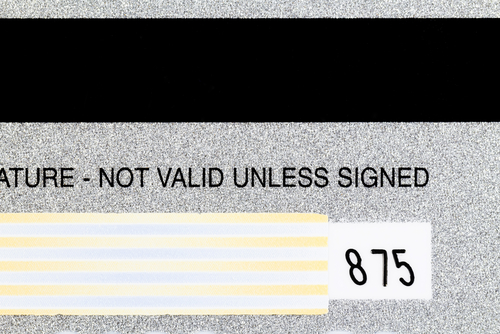
The location of a CVV on a credit card depends on the card issuer. The following card companies print it on the back of their cards:
The CVC on these is always three digits long and is typically located near or to the right of the signature area. Some newer cards without a signature strip may print the CVC elsewhere on the back.
On the other hand, American Express prints its CVV codes on the front of its cards, and the number consists of four digits. You can find the code above the main card number.
Why is my CVC number so important?
Your credit card’s CVC number is a key security feature because it proves you have the card in your possession when you make a “card-not-present” purchase, like with online shopping.
While the CVC adds an important layer of protection, it’s not a guarantee against fraud. Data breaches, phishing scams, or saved payment details still expose your card information, so make sure you handle your card carefully and only shop on trusted sites.
The CVC isn’t stored digitally in the magnetic strip or chip. Instead, those parts of the card contain their own encrypted verification codes for in-person transactions. This helps prevent counterfeit cards and highlights why it’s important to be aware of card skimming (which we look at in the next section).

How to keep your CVC safe
Protecting your card verification code is a simple but powerful way to reduce your risk of fraud. Here are a few tips to help you stay secure:
Never share it
Only input your CVC when you’re using a secure and trusted website to make an online purchase. Input it only in the section specifically designed for this code. Never share your CVC by email, text message (including WhatsApp), or over the phone.
Only shop on secure websites
The best way to tell if a site is secure is to make sure the website address begins with https:// and shows a small lock icon in the browser’s address bar. This means the site uses encryption to protect your data. Sometimes, you need to dig a bit deeper and click on the settings icon in the address bar, which will display a pop-up that states whether the site is secure. If you’re unsure, look up customer reviews or check that the business has clear contact information and privacy policies.
Be wary of phishing
Fraudsters often pretend to be from a reputable company by email, text, or phone, trying to convince you to hand over your credit card data. Remember, a legitimate company will never ask for this information over the phone or via text or email, so don’t click on any links or attachments asking for this data, even if it seems real.
Don’t write it down
Avoid storing your CVC anywhere other than on the card itself. Writing it down, taking a photo, or saving it in a notes app can put your financial safety at risk.
Beware of card skimming
Card skimming happens when criminals capture your card information using hidden devices or malicious software. There are two types of card skimming to be aware of: physical and digital.
- Physical card skimming: Criminals attach a device that records your card’s sensitive data at the point of use, such as at an ATM or gas pump. Always inspect card readers for loose parts or anything that looks out of place.
- Digital card skimming: Hackers can insert malicious code into websites to steal card information during checkout. Shopping only on secure and reputable websites can reduce this risk.
Consider using digital wallets
Payment apps like Apple Pay and Google Pay use a different mechanism to pay for goods online, known as tokenization. This replaces your card details with a unique digital code, making it much harder for scammers to commit fraud. Consider installing a digital wallet app on your smartphone and use it when buying online or in person.
Your CVC protects you from financial fraud
Your card verification code (CVC) adds an important layer of security when you shop online or by phone. It helps confirm that you’re using your physical card to make a purchase.
You can usually find the CVC on the back of your Visa, Mastercard, and Discover card, where it’s a three-digit number, or on the front of your American Express card, where it’s a three-digit code.
Following a few simple safety guidelines will go a long way in helping to protect you from falling victim to fraud and unauthorized use of your card, allowing you to shop online with confidence and peace of mind.
FAQs
Is the CVC the same as my PIN?
No. Your CVC is used to verify online purchases, while your PIN is used to verify in-person transactions at ATMs or card terminals.
Do all cards have a CVC?
Most major credit and debit cards around the world have a CVV for added security, although the location and number of digits vary by card issuer. If you can’t locate your code, contact your bank or card issuer for guidance.
What should I do if someone knows my CVC?
If you suspect your CVC or other card details have been exposed, contact your bank immediately. The bank can cancel your card and issue you a new one, which will have completely new details, including a different CVV.
Can I use my card without the CVC?
Most reputable websites require a CVC to confirm a purchase. If a site doesn’t ask for it, this could be a red flag. Proceed with caution or avoid entering your card details altogether.
What do I do if I lose my card?
If you lose your card, treat it as though it’s been stolen. Call your bank straight away and ask them to cancel the card and issue you a new one. Be sure to review recent transactions and update any recurring payments once you have your new card.
Why did card companies start using CVCs?
With the rise of online shopping, card companies needed to find a way to keep their customers protected against fraud in the digital world. A 3- or 4-digit code physically printed on the card was an effective way to ensure people’s data was more secure.
Is the CVC the same as my card number?
No. Your card number is a unique identifier that identifies the card as belonging to your bank account. The CVC number is a three- or four-digit code that appears on your card to verify transactions and reduce fraud.